Pebble -
a productivity app

.png)

.png)
Pebble is a tool that will help you foster mini-breaks into your busy "work from home" schedule and prevent burnout.
Overview
COVID -19 has made everyone work from home and this has become the "new normal". However, people have been facing a lot of issues in maintaining a work-life balance which has led to extensive work hours and even burnout. Focusing on this as the primary problem we have designed Pebble. The Pebble app reminds users to take mini-breaks throughout the day. As a result, leading to increased productivity and a happier community.
10 weeks
(June 2020- Aug 2020)
UX/UI Lead
UX Research
Strategy
Disha Vanzara
+ 9 others
Figma, Keynote, InDesign,
Photoshop, iMovies
Duration
Role
Team
Tools
Background
Working from home was not historically common — What changed overnight in March 2020, the entire world had to start working from home due to quarantine measures taken due to COVID-19. There was no time to adjust or adapt to this new life which was forced on everyone.

Pre - COVID'19
Post - COVID'19

9 %
17 %
54 %
Worked from home all the time
Worked from home once a while
Worked from home all the time
Design Process
Discover
Define
Deliver
Develop
Survey
User interviews
Desk Research
Defining Users
Market Analysis
Key Insights
Card Sorting
User Flow
Prototyping
User Testing
Final Designs
Visual designs
Process book
----- PROBLEM STATEMENT
Clearly define the work from home associated challenges and apply the design thinking process to craft a solution

Phase 1
DISCOVER
1
2
3
To uncover and understand the challenges faced while working from home (WFH)
To prioritize the most important pain points to solve
How would employers be able to help?
------ RESEARCH OBJECTIVES
Online Survey Results (N=45)
98%
of people say they would like the option to work remotely for the rest of their careers.
65%
of the employees think that they overwork at home
64%
of parents feel managing household errands while working from home is difficult
62%
are being less physically active outdoors
Secondary Research
From secondary reserach, we confirmed people are working significantly more and that there was an urgent need to help strike a work - life balance that would not only boost productivity but also maintain and safeguard well-being of employees
40 % employees

People are working enough hours as much a
Day work week
6

2X more
Work during the weekend

Experience
mental exhaustion

We conducted 18 interviews with professionals that had different personal situations to discover a wide variety of pain points of working from home

“It has become really hard to disconnect, since I no longer have an 8 to 5 schedule”. I have no family time now"
1. Creating a Work / Life balance
Mia has been facing many issues while working from home with her kids also at home studying virtually. In addition to working at home, "I have to be a partner, a parent, a friend, an employee, and most importantly, a person — somehow all at the same time". She notes she has been overworking since she has started working from home. She further adds "Work/life separation was always a delicate balance — but now; it’s harder than ever before."


Mia Perez
Age : 30
Status : Married with 2 kids
Profession : Manager

Sesha Awla
Age : 28
Status : Engaged
Profession : Engineer
2. Home environment is not work environment
Across all experience levels, ages, and populations, the conditions in which employees work and operate are crucial to performance. The workplace is designed for the job’s necessities. At Sesha's home, lack of office equipment, poor lighting, a bad internet connection, leads to frustrating and unproductive days
“I feel my productivity is much lesser when I am home and I miss talking to people at work. I want that back"


3. Communication related issues
Technological advancements makes communicating with others easy and instant. The problem occurs when this tool is overused and communication is overdone. Alley has been facing Zoom fatigue, screen exhaustion, and burnout.
“I have around 5-6 zoom meetings and I can't wait for a weekend where I don't have to open my computer "


Alley Luther
Age : 25
Status : Single
Profession : Banker

Sam Luca
Age : 23
Status : Single
Profession : Design Intern
4. New Employee Integration
Decorating the workstations of new employees who start remotely is no longer an option. New employees like Sam, find it difficult to make connections and adopt company culture when starting remotely
" Making an impression over a zoom call for me is the most important and challenging task because I want a permanent job in this company"


Phase 2
DEFINE
----- KEY INSIGHTS
1
People spend more hours working while working from home
This boosts productivity to an extent but can lead to burnout and family challenges due to lack of work - life balance. No separation between work and living space is a key root cause.
2
People have become inactive working from home
People forget or don't prioritize taking breaks like drinking water, exercising and stretching as work from home can be done sitting at one place
3
This lack of social interactions limits opportunities for networking and ideas arising from hallway conversations or stopping by a colleagues desk. The home environment does not provide an office ecosystem
While working from home people don't prioritize meeting their colleagues casually
4
Employers are willing to promote and incentivize employees to maintain high productivity
Human Resources at medium to large companies were open to various approaches, previously unthought-of, including reducing work hours, promoting breaks, and scheduling company-wide disconnect days as a way to maintain productivity.
Pain points
User Group
1
New College Grads entering the work force
2
Young Professional (2-5 years)
3
Parents working from home
Work Life Imbalance
(Due to overworking/productivity loss/ inactive lifestyle due to WFH)

Loneliness
Inability to build connections and fit in to work culture
Focus to solve work life imbalance (Due to overworking / productivity loss / inactive lifestyle due to WFH)
----- OPPORTUNITY AREA
Develop a solution for employers to facilitate work-life balance for their employees
Turning pain points resulting from work-life imbalance into design opportunities
Pain points
1
State of emotional, physical, and mental exhaustion

Design Opportunity
Prevent burnout through measures that promote striking a balance
2
Working from home has led to a lethargic and sedentary lifestyle

Encourage breaking the monotany of sitting in front of the computer
3
Little to no social interactions with colleagues, can lead to loneliness
Incentivize people to socialize without a work related agenda
How can we help people disconnect and make time for themselves ?
-
Taking enough breaks throughout the day will help employees boost their productivity and complete a given amount of work in shorter time
-
Breaks themselves are used for stress busting activities
Benefits of taking breaks

81 %
of employees
Who take lunch breaks
tend to be more productive and are satisfied with their job
TAKING BREAKS EVERY

10
minute.
nap
90minutes
Is important for preventing physiological fatigue and conserving focus


The most productive people work for 52 minutes, then break for17 minutes

52
minutes
Can increase blood flow to your head and boost creative thought
20 minute walks

During lunch breaks
result in more productive and satisfied employees
----- THE IDEA
What if we could encourage and incentivize employees to take multiple breaks during their day?
1
Pain points
State of emotional, physical, and mental exhaustion

Design Opportunity
Prevent burnout through measures that promote striking a balance
2
Working from home has led to a lethargic and sedentary lifestyle

Encourage breaking the monotany of sitting in front of the computer
3
Little to no social interactions with colleagues, can lead to loneliness

Incentivize people to socialize without a work related agenda


Design Requirements
Seamless break taking
-
Gamification
-
Promote activities outside work
-
Rewards
-
Community
What could we learn from the players in the market ?
Pebble was inspired by a combination of the following identified market trends

Tomato timer
A system of regular work - break - work sequence to boost productivity


Duolingo
Gamify the experience: Get rewarded for task completion

Strava
Social feed of physical activities to see friends' progress

Tamagotchi
Nurturing a "living" digital entity that engages user
Pebble Requirements
Automatic hassle-free
break scheduling
Get engaged with the breaks,rewards for encouraging taking breaks
Track progress and build community to motivate
Mirroring your accomplishments and tracking progress.

Phase 3
DEVELOP
.png)

.png)

Pebble user journey map

Pebble brand identity


Primary Colours

Secondary Colours

Typography
Poppins Light
a b c d e f g h i j k l m n o p q r s t u v w x y z
A B C D E F G H I J K L M N O P Q R S T U
Poppins Semi Bold
a b c d e f g h i j k l m n o p q r s t u v w x y z
A B C D E F G H I J K L M N O P Q R S T U
Open Sans
a b c d e f g h i j k l m n o p q r s t u v w x y z
A B C D E F G H I J K L M N O P Q R S T U
Open Sans Bold
a b c d e f g h i j k l m n o p q r s t u v w x y z
A B C D E F G H I J K L M N O P Q R S T U
With Pebble's features defined, the next steps were to develop wireframes , prototypes for iteration based on user feedback
Wireframes and Iterations based on A/B Testing


Better Visuals
Both the users preferred the 2nd Option as it was more intuitive to them as it looked similar to Instagram with more visual focus as compared to text. They liked it more because they could see more visuals and get more information as they said they hardly read the description written on a post by their friend,
Option 1
Bigger thumbnails and images and more information
Option 2
More visuals, less information
Long scroll- less clicks
All three interviewees preferred the longer scroll option. Initially, I thought that separating each break from each other would be better to segregate but the users preferred keeping everything together as they believed that a longer scroll would make it easier and faster to see at a glance.


Option 1
Keeping all the breaks together and thus making it a longer scroll option

Option 2
Separating each break from another
Hi-Fidelity Mockups
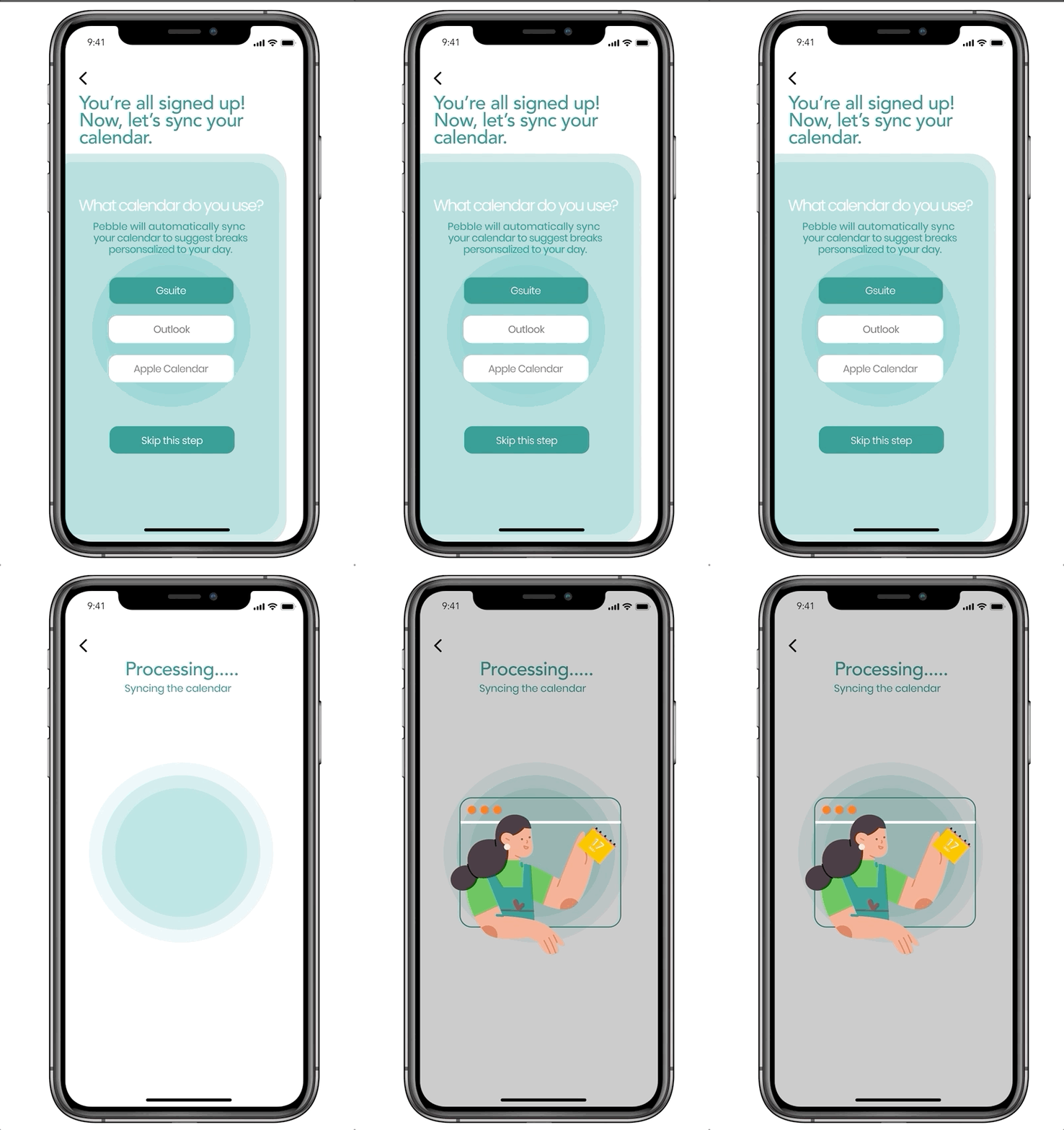
SYNC
Once you’ve downloaded the app and you are all signed up, you have the option to sync a calendar of your choice.
Once your calendar is synced, Pebble will craft breaks into your schedule. If you don’t want to sync to your calendar, you always have the option to customise your own break schedule
SETUP
Once you’re logged in, you start your day by choosing the activity for longer (boulder) breaks and shorter (pebble) breaks. Select when you want boulder breaks to occur or pebble will automatically schedule them for you.
Boulder break activities include things like running, yoga, listening to music, meditating, reading, taking naps among others based on a user's interest.
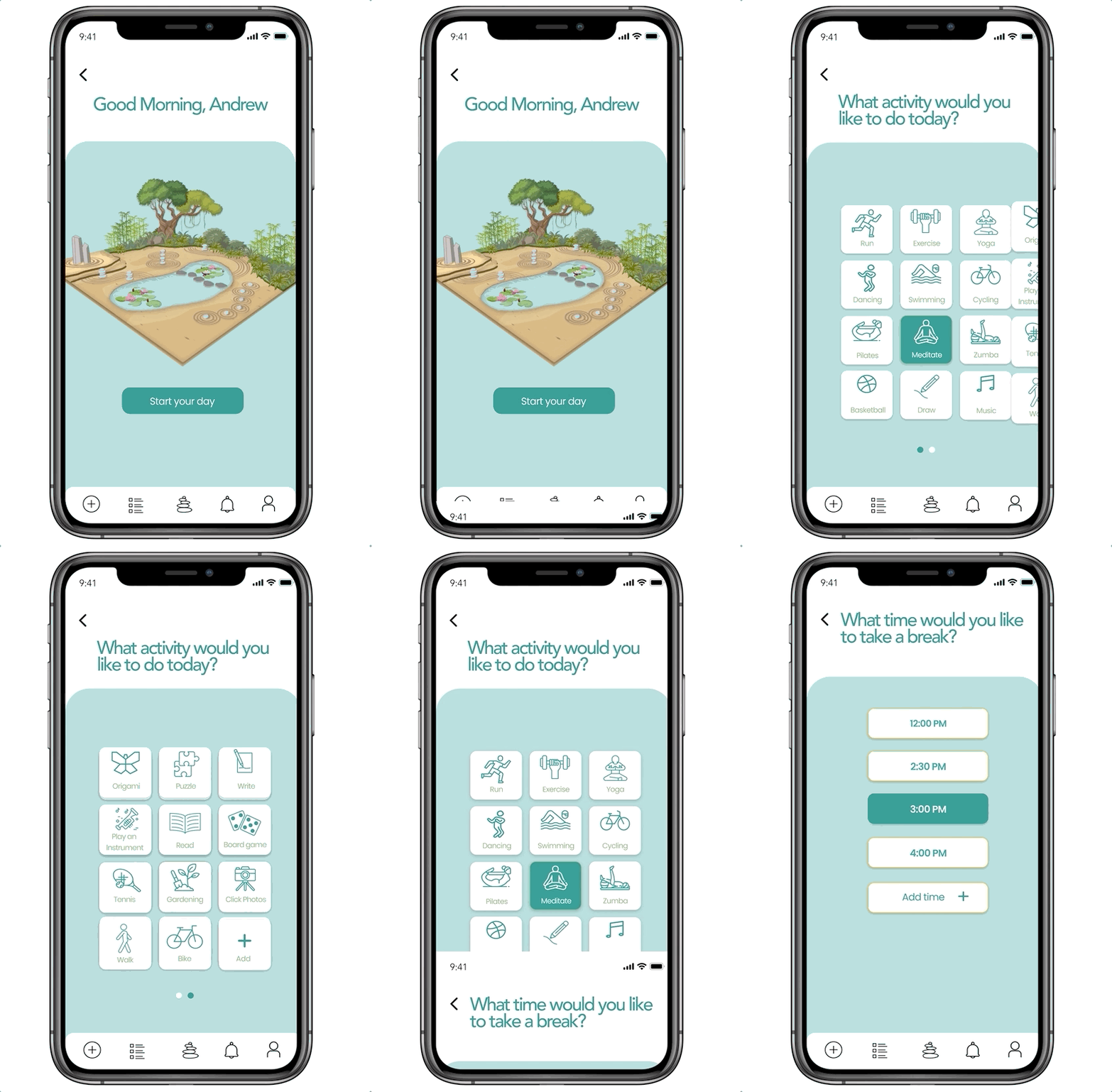


REMINDERS
After your breaks are set up, you’ll start your day. You will receive two types of notifications through the day: one for pebble breaks and one for boulder breaks.
Pebble breaks are notifications that the app automatically sends you to remind you to drink water, step away from the computer, take a quick walk, stretch, breath deeply etc
The type and number of breaks you take determines the number of pebble points you are awarded each day
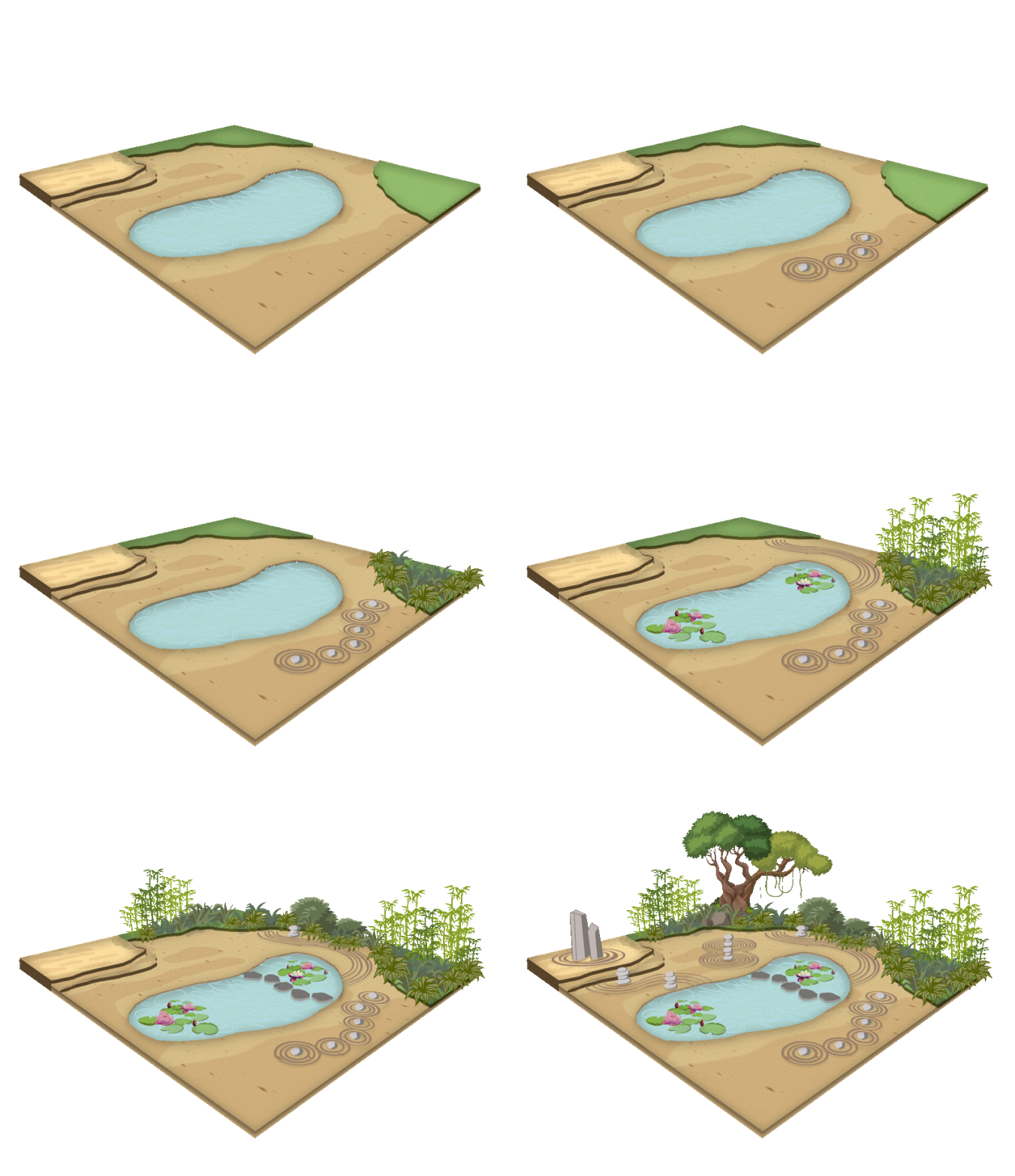
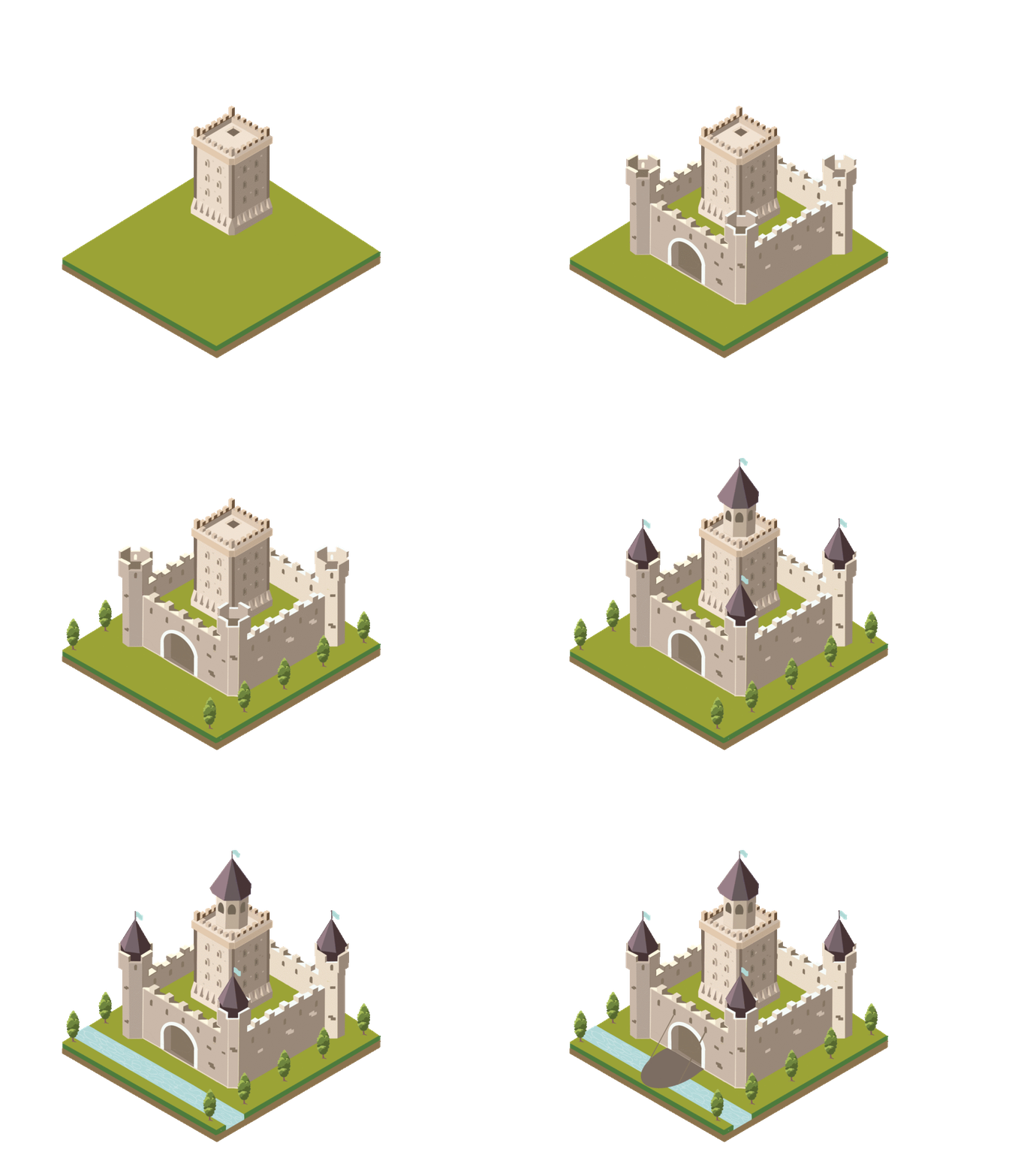
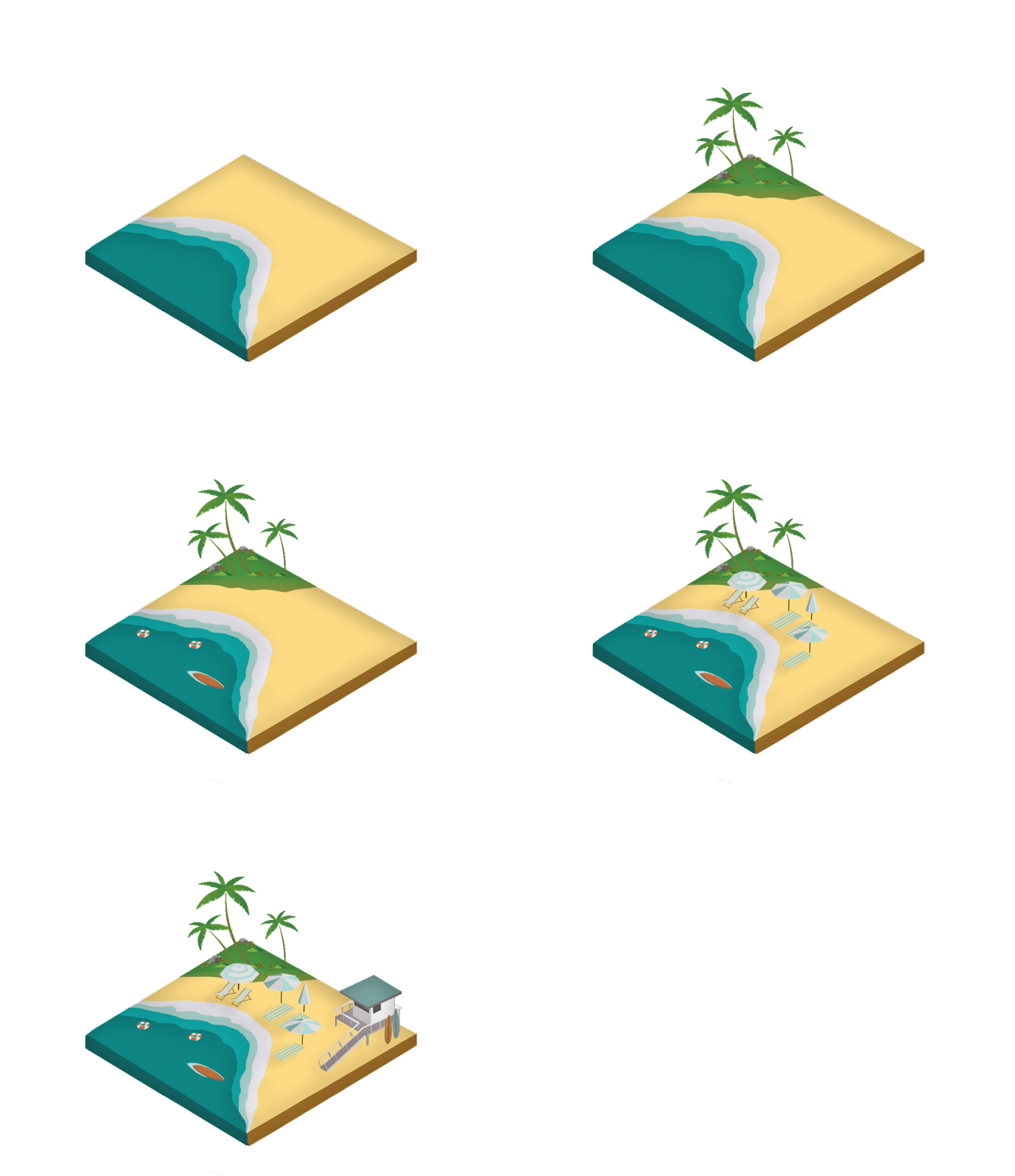
Every user is allocated an empty space that can be customized to build what they like including zen gardens, castles, island get aways etc.
Pebble points are used to not only build a unique design space but also add custom features to it. Eg a pond in the garden or a moat around a castle.
Building a space and making it your own is a process and users will slowly and steadily build their space over time.
Pebble points are earned by taking the boulder and pebble breaks.
YOUR GARDEN

REWARDS
Different levels of your pebble space development result in real world rewards through points which can be redeemed at Starbucks, Orange Theory , Uber etc.
COMMUNITY
Your daily break activities can be shared with your friends and colleagues on pebble . You can even see the progress of each others pebble spaces. If one likes they can also challenge their friends for a pebble space growing race which creates a fun competition to encourage each other to take breaks


Next Steps:
-
More user testing for the app user flows
-
Develop desktop wireframes and mockups
-
Collaborate with a small company to pilot/beta test the end to end pebble challenge process
-
Build analytics into Pebble
Learnings:
-
It's always important to listen to the user and follow the design process
-
As a lead, it was important to consider all the perspectives from each team member
-
Breaks are super important and I strive to incorporate them into my college schedule ✌️